Thoughts on Crafting Express
After trying Crafting Express as a solo user, I wanted to share some thoughts on the setup, coding experience, and where I think the product could go. I can’t really leverage the full potential or intended experience of the app, but I think the idea is promising. In my mind, Crafting Express belongs to the group of “agent control plane” which includes T3 Code and Amp, so those harnesses will be my main point of comparison.
Setup
While the setup was not painful, it wasn’t the smoothest either. I didn’t see any estimates of storage or memory use, and my first run failed because I didn’t have enough space on that SSD. I had another issue registering a provider when the “Name” field did not accept capital letters. Neither was a huge issue, but they threw unintuitive error messages and took a second.
I tried to configure an alternative OpenAI-compatible provider (OpenCode) in various ways for about half an hour before giving up. I’m not sure if I made a mistake, or custom providers aren’t supported. When configuring a model, there’s no button to test the connection, so I had to navigate out of the settings menu and start a chat, which was inconvenient.
I also would have liked to be able to connect to a Crafting Express instance from another computer, which would have allowed me to get a better feel for the multi-user experience.
Coding experience
The first thing that confused me is that the UI you drop into by default does not seem to be intended for coding. While there is a chat menu, it seems to be more for configuring the product than actually doing the work. I decided to ask the agent for help:
How do I start an agentic coding session in the nostromo repository, which is configured in the griffinevans sandbox?It told me to start a conversation from the Agentic UI, or run an interactive session via the CLI.
When I tried to run an interactive session via the CLI, it was not actually interactive (it terminated after one turn):
/tmp: cs llm session run --interactive --name test "hello"
✔ select the only one - grfwings
Hello! I can help you manage Crafting sandboxes. I can create sandboxes from templates or Git repos, list and describe your existing sandboxes, resume them, and set one up as your working environment for development tasks.

What would you like to do today?
/tmp:
I did find the IDE options in Sandboxes. In the Terminal window cs claude worked, but cs codex failed with:
owner@app:~$ cs codex
Fatal: No available provider
I’m guessing this failed because I had Anthropic registered as a provider but not OpenAI. However, both Codex and Claude Code support external provider models, so I think the harnesses should be independent. Separately, I couldn’t find a way to integrate an alternative harness such as Pi or OpenCode via the terminal (I could install them, but not connect them to my configured providers).
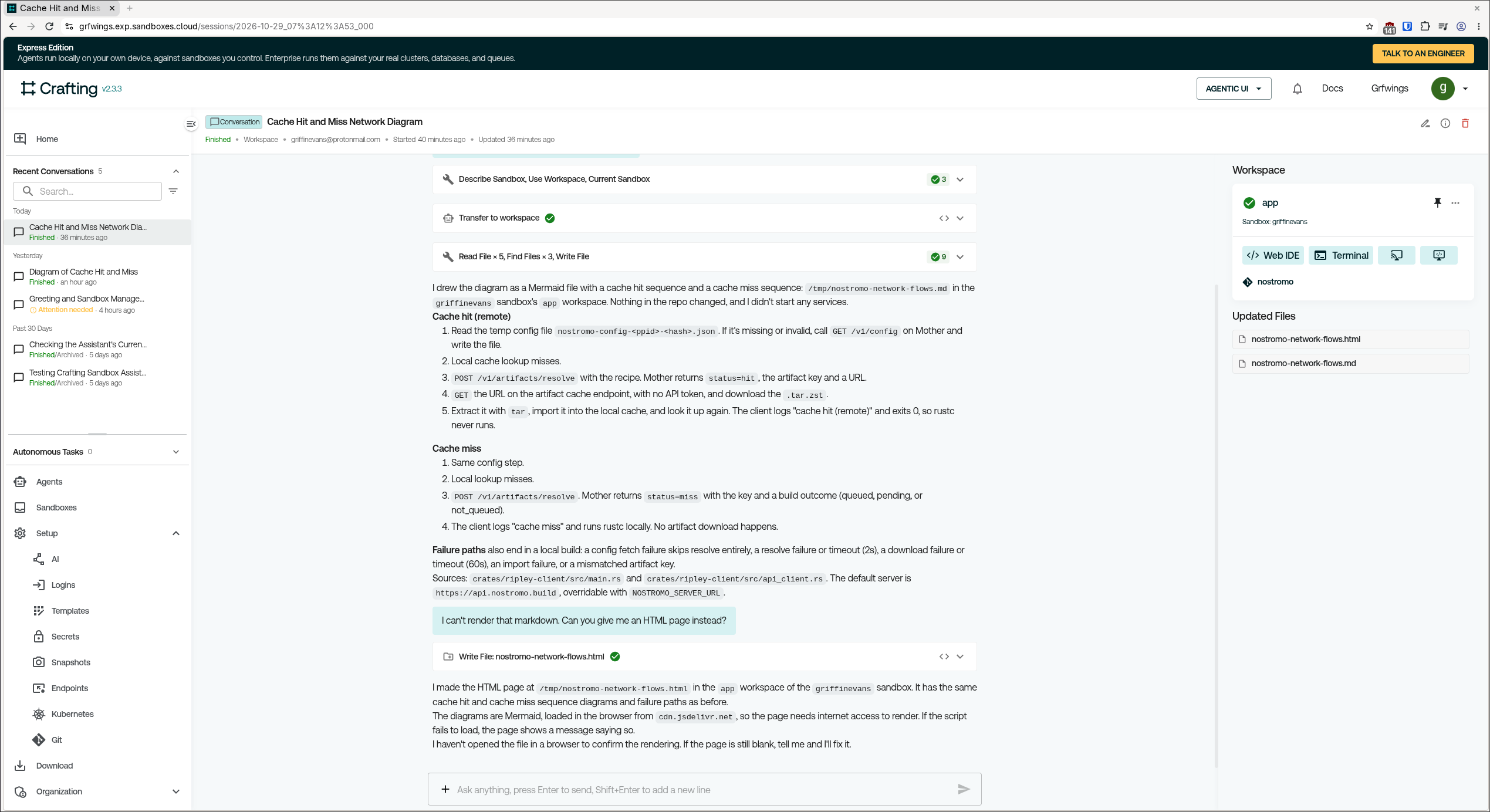
Taking a step back, this is the biggest source of friction I had with Crafting Express: I can’t tell where the work is supposed to happen. In the main UI, I can define agents and then create a chat with them, but I can’t see the codebase, and the chat UI is quite limited. For example, I can have an agent generate a Mermaid diagram or HTML page to visualize my program, but I can’t render it in the UI. Opening the Web IDE or the Terminal opens a new webpage, rather than a panel alongside the chat. Meanwhile, if I do decide to use Claude Code or Codex in the terminal, I can’t use the agent personas or model aliases I created for Crafting.
Suggestions
My suggestion would be to lean into agent orchestration and the top-level design. I would look at T3 Code and Amp for inspiration here, specifically around how they present and manage an agent control plane experience.
I would also like to see more separation in the UI between options for administering Crafting Express, like Kubernetes config, and options for using Crafting Express, like Agents and Conversations.
What I liked
Secrets. Secrets are one of the biggest pain points (if not the biggest) in agentic coding today. Having a way to securely and easily provide secrets to the agents is fantastic. It makes everyone’s life way better.
I like being able to create model aliases like “Coding”, “Fast”, “Smart”, etc. This feels intuitive and useful.
There’s a lot of functionality here that would be valuable in an enterprise context, like snapshots and endpoints.